
We have made RouteMAX a little easier to use.
On-the-Fly City or Trap Conversion
Sometimes a route just needs to be different. The freight is planned for the right route, but it’s the wrong TYPE of route. We added an editable Route Type column to ease that pain.
To change a single route, just double-click on the grid.
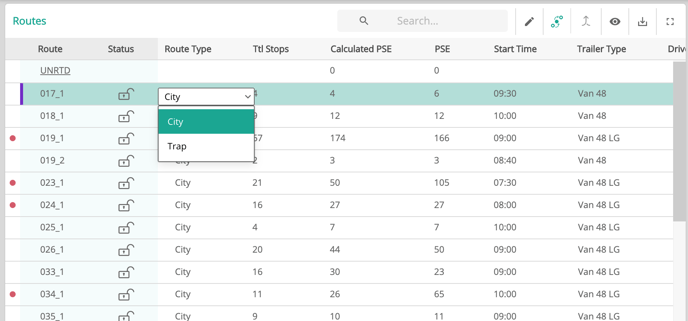
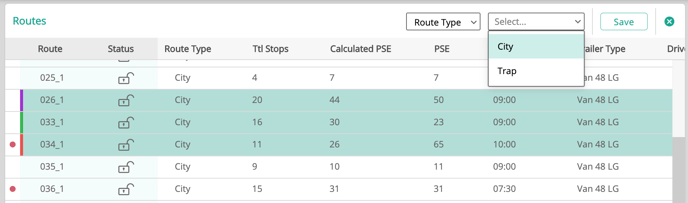
For multiple routes, use the Edit button above the Routes grid.
Real-time Inbound Planning Report
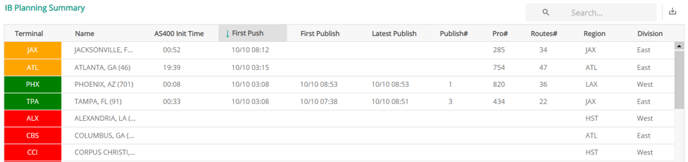
For users with access to the Inbound Planning Summary, the report now updates in real-time.
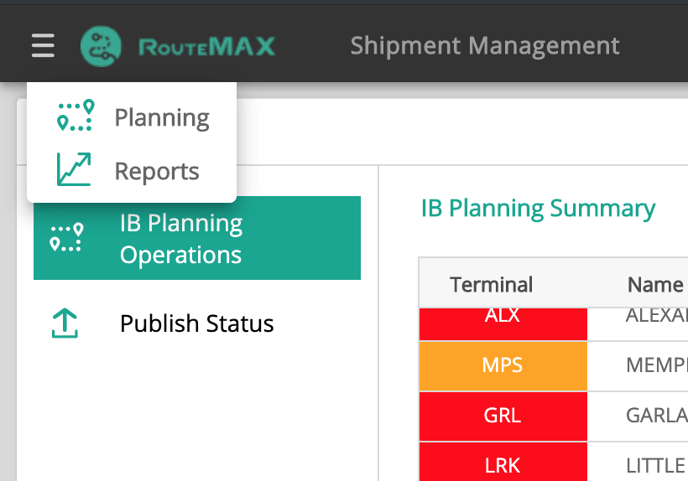
Access is the same as before: from the menu in the upper-left corner select Reports > IB Planning Operations. Whenever a terminal imports or publishes data, the report will automatically update. The same information—how many bills, how many routes, etc.—are still be there, but in a slightly better at-a-glance format. Green, yellow and red color-coding indicates which terminals have published, initialized, or not yet started, their routing.
Routes Exceeding 50 Stops Will No Longer Delay Planning
Sometimes a delivery route (temporarily or accidentally) has more than 50 stops. Even though delivering 50+ stops is impossible in LTL, RouteMAX was programmed to make the attempt. Optimizing the impossible just took too much time, so we made a change.
Now if a single route has 50+ stops, RouteMAX will disable the Sequence Optymization button.
To handle a route or zone with 50+ stops, just run the Route Optymizer . RouteMAX will create an efficient set of routes for the area, and sequence optimize each of the resulting routes in the usual few seconds.
.
Better Scrolling
Previously, the grids did not always keep up with the user, and rapid scrolling would result in temporary blank space on the grids (as in the picture below). We went under the hood and made some adjustments, vastly improving the refresh.

Other Improvements & Bug Fixes:
As always, we made some subtle technical improvements to make RouteMAX work better and faster.