City Dispatch: UnVoid Pickup, Driver Labels Visibility Control and More
Date: 8/21/2023
Version: 3.17
1. Unvoiding Pickups
Voided pickups can be unVoided through the pickups grid. Go to the pickups grid, filter Voided pickups, and select a voided pickup. For the selected pickup, the bin icon will be changed to “unvoid” and users can unvoid the pickup. Once unvoided the pickup will go to Unassigned.
Similarly, any pickups unvoided through AS400 can be seen under unassigned pickups.

2. Easily spot newly added pickups:
We have changed the color of the pickup icon for the newly created pickup to blue.
.png?width=688&height=328&name=image%20(1).png)
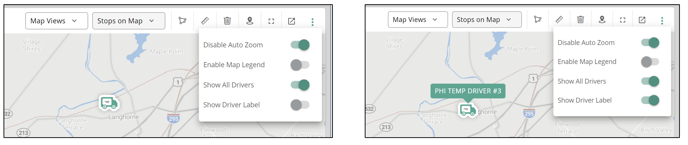
3. Hide Driver Name Labels on the Map: We have included the option to show/hide driver labels(names) from the dispatch map while showing driver locations. This setting will be persisted until the user changes it back.
4. Pieces information on the Driver’s stop list
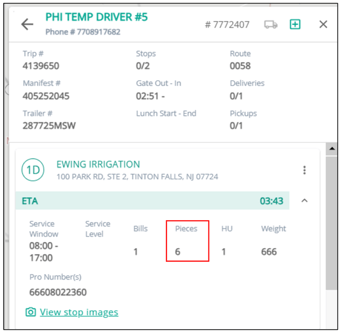
We are now showing pieces in the driver stop list card sequence.